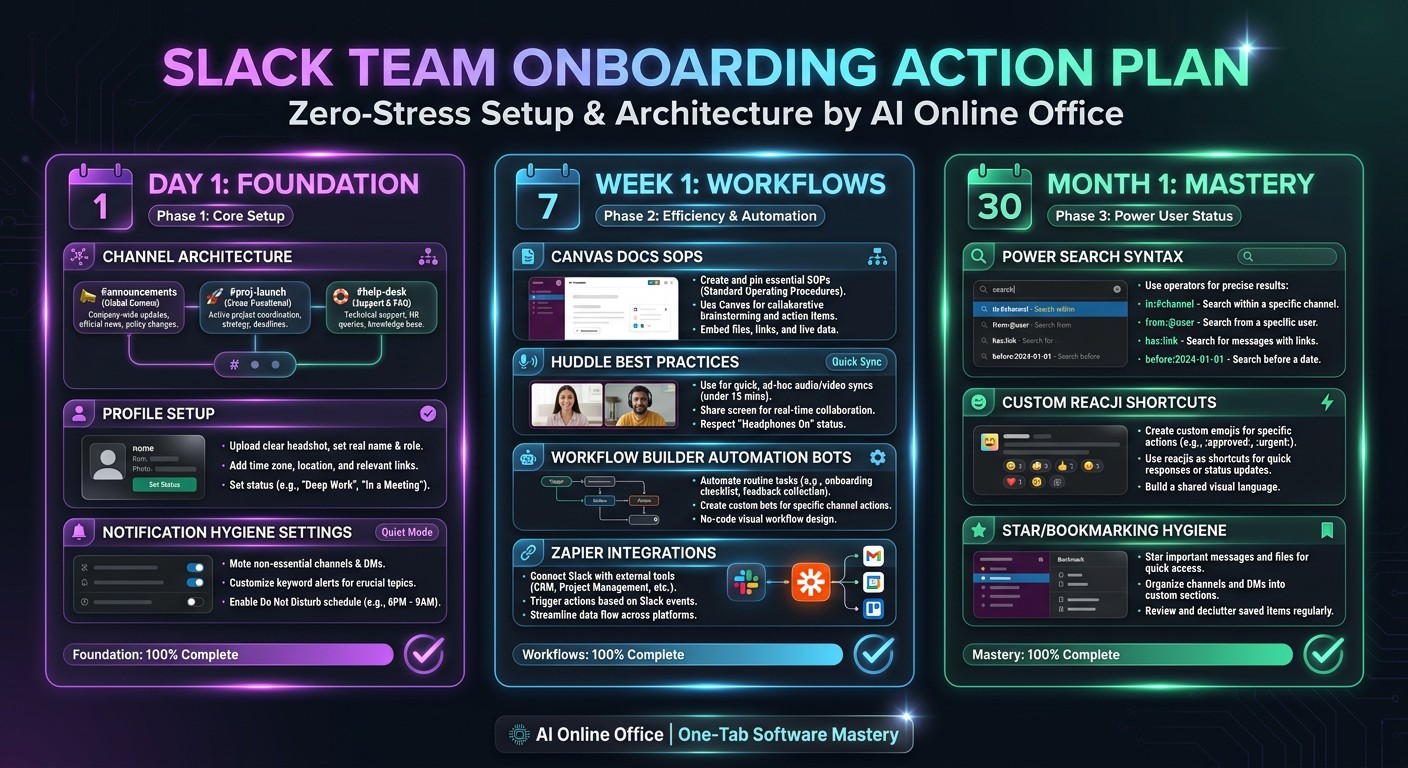
Software onboarding is the process of helping a new employee use your business tools correctly for their actual role. It is not the same as customer onboarding into a SaaS product. For a small business, a good starting point is one repeatable task, clear access permissions and a named person who can check the result. You do not need a large training department to begin.
Before day one: access, ownership and a real task
- List the tools required for the role, not every subscription the business owns.
- Assign an owner for each tool and use individual accounts with the minimum permissions needed. Do not share passwords.
- Choose one first task: update a test CRM contact, find an SOP in Slack or draft a CMS item without publishing it.
- Prepare approved sample data. Remove customer details, financial information and secrets from training screenshots.
- Write down who approves live changes and where the learner should report a blocker.
A first-week software onboarding checklist
- Day 1 — Confirm sign-in, multi-factor authentication and the correct role. Find the help channel, the process guide and the practice data.
- Day 2 — Demonstrate one task from start to finish. Explain the desired result before naming the buttons.
- Day 3 — Let the learner repeat it with sample data while someone checks the result. Record unclear instructions, not just mistakes.
- Day 4 — Have the learner follow the written SOP without a live walkthrough. Correct missing prerequisites or ambiguous steps.
- Day 5 — Complete an appropriately scoped real task with approval. Agree which tasks can now be done independently and which still need review.
These days are a suggested sequence, not a promise that every employee will be proficient in a week. A complex role, accessibility needs or unfamiliar software may require a longer, supported rollout.
Example: onboarding someone into Slack
Start by joining the channels relevant to the role, setting a recognisable profile and finding the team's pinned or saved reference material. Practise posting a reply in a thread, finding a message with in:channel and choosing notification settings that match the team's expectations. Add workflows and external integrations only when there is a specific need and an administrator has approved them. Slack features and limits vary by plan.
Choosing your communication platform? Read Slack vs Microsoft Teams before designing the onboarding process around it.
Copy this reusable SOP template
- Task and outcome: what should exist when the work is complete?
- Owner and audience: who maintains this guide and who uses it?
- Prerequisites: account role, approved data and any required permissions.
- Steps: a short numbered sequence with exact field names where they matter.
- Check: how to confirm the result in the destination tool.
- Stop conditions: when to pause and ask for approval rather than guessing.
- Recovery: how to undo a test change, or who to contact when an action cannot be undone.
- Last reviewed: the date someone actually tested the instructions.
Where AI Online Office can help — and where it should not decide
Use AI Online Office as software guidance alongside the tools you already use: describe a task, ask for a checklist and turn the reviewed answer into a reference note. Ask it to explain unfamiliar terms rather than pretending everyone knows them. Your business still controls accounts, permissions, approvals and the accuracy of its SOPs. This is guidance, not automatic provisioning, a live Slack integration or a replacement for your IT administrator. Do not upload confidential training material without your organisation's approval.
See the business use cases on AI Online Office for businesses. For current subscription terms, use the pricing page rather than the illustrative figures in any diagram.
Measure readiness, not how many videos someone watched
Track whether the person can finish the chosen task correctly, how many times they need help, and which steps need rewriting. Measure time to the first independently checked task if that is useful, but compare similar tasks and roles. A training video view is not proof of competence, and a faster completion time is not useful if it produces an incorrect record.
Software onboarding FAQ
Who should own software onboarding in a small business?
The manager owns the role's outcomes, the tool owner checks the process, and the administrator controls access. One person may cover several roles, but responsibilities should still be explicit.
Do we need a dedicated onboarding platform?
Not always. For a small team, a maintained checklist and a short checked walkthrough may be enough. Dedicated systems become more useful when you need structured assignments, completion records or formal compliance reporting.
Should we automate onboarding immediately?
Document and test the manual process first. Automate stable, approved steps only after you understand failure handling and permission requirements.
For the automation decision, read Zapier alternatives for business workflows.
Ready to evaluate software guidance for your own work? Review AI Online Office plans and choose based on your actual needs.