 AI Online Office
Master any software.
Skip the learning curve.
Ask a question or drop in a screenshot, and get the exact next steps for the software you're already paying for. No tutorials. No tab hopping.
Plans start at $97/month · 30-day money-back guarantee · cancel anytime
See how it works — just over one minute. Zero jargon. Pure clarity.
Most people don't need more software. They need help using the software they already pay for.
You bought the software. Now what? Most tools don't fail because they're poorly designed. They fail because nobody shows you how to actually use them. So you stall, search, and sink into tutorial hell. Your AI Online Office removes the training phase entirely — giving you real-time, context-aware guidance the moment you get to work.
- Teams repeat the same software questions every week
- New hires take too long to ramp up on your stack
- Mistakes happen in live systems that cost real money
- Tutorials are slow, outdated, and forgotten by Monday
- Global teams need answers in their own language
- SOPs are scattered across docs nobody opens
Three things you won't find in a single AI chat window
The best AI for every question, ten languages you can switch between mid-sentence, and a safe place to practise before you touch anything live.
You ask. We route it to the best mind for the answer.
No more guessing which model to use. Your AI Online Office sends each question to the AI engine built for it — then remembers the context so every next answer is faster and more personal.
Automatic routing
The office picks the best AI for the task, so you never have to.
Contextual memory
It remembers your tools, your goals and your last answer.
Always improving
New models are added behind the scenes — no settings to touch.
One AI office. 10 languages. No restart needed.
Ask, record, and work in 10 languages — and even switch languages mid-conversation without losing context. Then export synced .vtt subtitles for global teams, clients, or audiences.
Global teams
Ask in English, switch to Chinese, continue in Spanish — context stays with you.
Client walkthroughs
Record once and deliver synced .vtt subtitles in every client's language.
Creator distribution
One video, ten language tracks, worldwide reach from day one.
Click around without breaking anything.
Practice real workflows in a risk-free simulator before you touch your live accounts. No real data, no accidental posts, no mistakes that matter.
Onboard new hires
Let them click through real workflows before they touch live customer data.
Test automations
Try Zapier-style flows and CRM steps safely, then build them for real.
Train global teams
One safe practice environment every employee can use, in any language.
Your whole online workday, connected in one place
We created AI Online Office because separate chatbots, notes, tutorials and recorders make you start over in every app. Here, one answer can become a saved note, a safe practice run, and a walkthrough you can share.
Fixed a broken Zapier error in seconds
Ask your AI Online Office what went wrong, upload the screenshot, and watch it decode the failure and rebuild the workflow — visually.
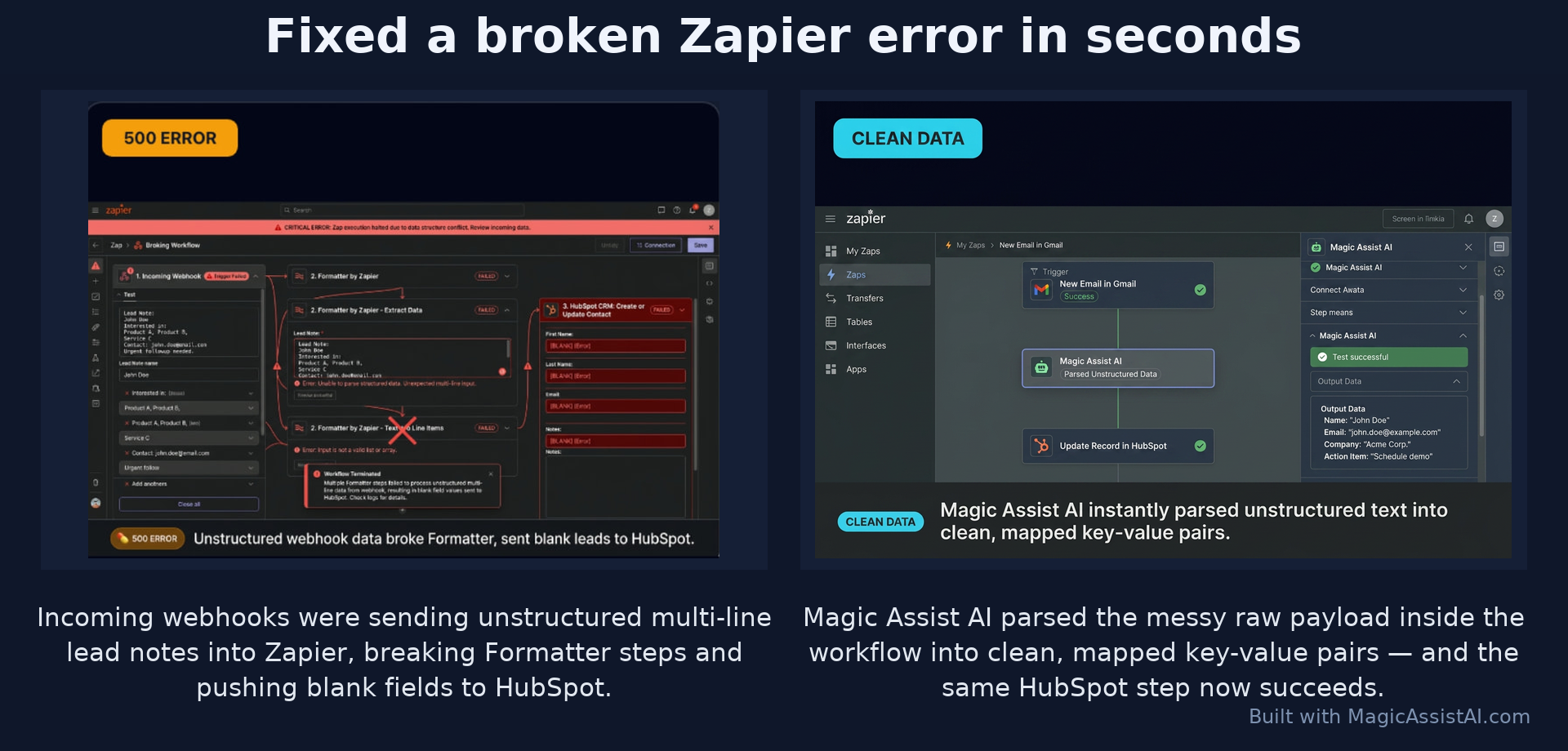
Before: a Zapier payload error, blank leads sent to HubSpot. After: clean mapped data and a successful HubSpot update.
If you work online, this is where your day happens
Master your work with your AI Online Office — anything you need to do online, all day, every day. Save hours each day.
Working online in the AI Age means twelve tools, ten tabs and a hundred small questions a day. AI Online Office is the one office you work from — it answers, it remembers, it rehearses and it records. You stop searching and start finishing.
Hours back, daily
Stop searching. Start finishing.
No more 40-minute hunts through help docs, forums and half-watched tutorials. Ask once, get the exact steps for your screen, move on.
One brain for your stack
Your office remembers.
Every tool gets its own workspace with your notes, SOPs, files and past answers — so nothing is ever solved twice.
Work like a team of five
Do the work, not the learning.
Ask, save, practise and create in one tab — the daily output of a whole back office, run by one person in the AI Age.
A real day inside your AI Online Office
This is what your AI Online Office is actually for. Not a tool you open when something breaks — the office you work from every day, in every piece of software you already pay for.
“My Shopify discount code isn’t applying at checkout.”
The exact five clicks for your store settings — fixed before the coffee cooled.
Screenshot of a red Zapier error, dropped straight in.
It reads the screen, decodes the payload error and rebuilds the field mapping.
“Turn that fix into an SOP for the team.”
A clean step-by-step SOP saved into your HubSpot workspace, ready to reuse.
“I need to change the live ad budget and I’m nervous.”
Rehearse the whole workflow in the simulator first — then do it live, once, correctly.
“Record me showing the new invoice process.”
Screen, mic and webcam recorded with AI subtitles in 10 languages, exported in a click.
“Find the best YouTube video for this — and skip the fluff.”
One playable video, the useful points, and exact timestamps for the moments worth watching.
Six moments. One tab. That's a normal day in your AI Online Office — master any software and get work done.
What is an AI Online Office?
An AI Online Office is one place you work from all day where the AI already knows your software stack. You ask any question about any tool and get the exact steps, save the answer so it's there next time, practice the workflow before you touch anything live, and record or create what you need — without leaving the office.
AI Online Office is your daily workspace, built as the world's first Software Mastery System. If you work online, this is where your day happens — and where the hours come back.
Explore the AI video summarizerWhere you get unstuck every day — question or screenshot in, exact steps out.
Where your work is kept every day — answers, notes and ideas saved automatically.
Where you rehearse every day — run the workflow safely before it goes live.
Where you produce every day — recordings, walkthroughs, guides and images.
- Ten browser tabs, none of which know what the others are for.
- A course you never finished and a folder of screenshots nobody understands.
- You explain your setup from scratch to a chatbot every single time.
- Yesterday's answer is gone, so today you look it up again.
- You test the risky change on the live account and hope.
- One place that already knows your tools, your setup and your goals.
- Every answer saved to your notes the moment you get it.
- Pick up mid-thought — on your laptop, then your phone.
- Rehearse the change in a simulator, then do it once, correctly.
- Find or paste a YouTube video and get the useful parts with timestamps.
- Turn the fix into a recording or SOP your team can follow.
Every room feeds the next
That's what makes it an office instead of a chat window. The work compounds.
Answers
Ask any tool question
Notes
Saved automatically
Practice
Rehearsed safely
Recordings
Shared with your team
Who is an AI Online Office for?
Anyone who works online — founders, freelancers, agencies, e-commerce sellers, marketers, support teams and small business owners who use a lot of tools and lose hours to tutorials, help docs and trial and error.
How is it different from a general AI chatbot?
A chatbot answers one question and forgets. Your AI Online Office remembers your setup, keeps every answer in your notes, lets you rehearse the workflow, and records the walkthrough — so each part feeds the next instead of starting over every time.
Do I need to know the software first?
No. Upload a screenshot of the screen you're stuck on, or paste a tool name or URL, and you get step-by-step instructions for exactly what you're looking at. No course, no prior knowledge.
Your AI Online Office for the AI Age · 30-day guarantee · cancel anytime
Why not just YouTube, a course, or a chatbot?
Because none of them are an office. They each do one slice of the job, then leave you to carry the rest.
| What you actually need | YouTube tutorials | An online course | A general AI chatbot | A virtual assistant | AI Online OfficeYour AI Online Office |
|---|---|---|---|---|---|
| Answers your exact question, right now | partly | ||||
| Remembers your tools, setup and goals | partly | ||||
| Keeps every answer in your own notes library | |||||
| Lets you rehearse the workflow before it goes live | partly | ||||
| Records the walkthrough you can send to someone else | partly |
One subscription replaces the tutorial hunt, the unfinished course, the chatbot that forgets you, and the assistant you'd have to train. That's the whole point of having your own office.
Built for people who rely on software to do real work
Whether you're stuck in one tool or onboarding a whole team, AI Online Office meets you where you are.
Individuals stuck in tools
Stuck in Notion, Shopify, Zapier or WordPress? Ask, screenshot, and get the exact steps — no tutorials, no waiting.
Founders & operators
Turn your software stack into step-by-step guidance so you stop being the help desk for your own business.
Agencies
Onboard clients and VAs faster with saved SOPs, workspaces, and guided workflows that anyone can follow.
Creators
Record once, publish everywhere — Magic Studio subtitles, translations, and Wow Moments built for Shorts and TikTok.
Support & sales teams
Decode errors, troubleshoot live issues, and answer 'how do I…' questions in seconds instead of hours.
Businesses onboarding new hires
Let new employees practice in the simulator and learn your stack with workspaces — productive from day one.
How many hours does your software stack cost you?
Move the sliders. This is the time your AI Online Office is built to hand back to you — every single month.
That's roughly 5× the cost of the $97 Starter Cockpit — from one room of the office.
- No tutorial hunting — the answer is the first thing you get.
- No re-explaining your setup — it already knows your stack.
- No guessing on live accounts — practise it first.
Estimate based on a 22-day working month. Your mileage will be your own.
Speak or type in your own language — and switch mid-conversation.
Get clear answers from your AI Online Office in English, हिन्दी, Español, Français, Deutsch, Português, العربية, 中文, 日本語 or Italiano. Switch language without losing context — one tap, same conversation.
Your first ten minutes in the office
No setup marathon. No onboarding course. You open the door and start working.
Walk in
Create your account and name your first workspace — your stack, your client, your project.
Ask the first real question
Paste a tool name or drop a screenshot of the screen you're stuck on. Get the exact steps back.
It starts remembering
The answer lands in your notes, and the office learns which tools your day is built on.
You've already got something to send
Record the walkthrough or export the steps to PDF — for a client, a teammate, or future you.
30 days, no arguments
Use the whole office. If it doesn't hand you hours back, we refund you — automatically.
Cancel in two clicks
No calls, no retention scripts, no 'contact us to cancel' maze. It's your office.
Launch price, locked for life
Every room we add later — voice, studio, new tools — comes at the rate you joined on.
People who were "not techy" — now getting things done every day.
"I don't know much about computers, but I wanted to start my own YouTube channel. AI Online Office walked me through every single step — and I've got my own channel up and running. I use it every day now for ideas and getting things done."
"I got AI Online Office to keep track of my crypto accounts and have everything I need in one place. It's working even better than I expected — a big time saver and a genuine help. Well done AI Online Office."
"AI Online Office walked me through the Fiverr setup process with pro tips, and now I own my own online transactions business. It even gave me a follow-up guide on how to start making money fast. Great platform — 5 stars."
Not a course. Not a chatbot. An office you open every morning — and it works with any software you use.
Every plan is the full AI Online Office — ask, save, practice and create. Choose the level of guidance, creation, and team support you need. One subscription. Every tool. Zero feature gates. 30-day guarantee — cancel anytime.
These prices will not last. Subscribe before the change and keep this rate forever — including every future upgrade and add-on we release.
You get what you pay for. And then some.
Every plan includes Contextual Memory — your tutor remembers you across every chat. 30-day money-back guarantee.
💡 A virtual assistant who actually knows your software stack costs $2,500+/month. AI Online Office gives you the same clarity, 24/7, for a fraction of the price — with zero training, zero fluff, zero tutorials.
or $80/mo billed annually
- + 1 credit = 1 full automation, deep SOP, or error decode
For solo operators done wasting weekends on YouTube tutorials.
Best for: freelancers & solopreneurs learning 1–3 tools.
- 🧠 Contextual Memory — your tutor remembers every chat, file & screenshot
- 📚 Works with ANY software — plus a 35+ one-click library (Notion, Shopify, Stripe, HubSpot, Figma…)
- ⚡ All 10+ Magic Shortcuts — Cheat Sheet, Decode Error, Action Plan, Fluff-Cutter
- 📎 Universal uploads — screenshots, PDFs, CSVs, docs, images
- 🌐 Live web search + real-time date sync (never outdated answers)
- 🗂️ Up to 3 workspaces with persistent notes & memory
- 🖥️ Interactive UI Simulator — practice clicks risk-free
or $112/mo billed annually
- + 1 credit = record, subtitle & export a full walkthrough video, ready to send
Everything in Starter + the full Magic Studio recording suite.
Best for: course creators, coaches & client-facing pros who teach as they work.
💡 Loom-style recorders alone cost $15–$29/mo. You get Magic Studio + every Starter feature for just $38 more.
- 🎬 Magic Studio — record full screen, single window or browser tab
- 🎙️ Mic + optional webcam bubble overlay (draggable, resizable)
- 🔍 Smart Mouse Zoom — auto cinematic zoom-in on your cursor, zoom-out after 1.5s idle
- ✨ Glowing mouse pointer highlight while you record
- 📝 Live subtitles burned in as you talk — 10 languages
- 🎨 Full subtitle colour wheel + font size + position controls
- 📥 One-click export — MP4 video + matching .SRT subtitle file
- ✨ Wow Moments — side-by-side Before/After posts (16:9 or 9:16 for Shorts & TikTok) with burned-in captions
- 🗂️ 5 workspaces + everything in Starter Cockpit
or $164/mo billed annually
- + 1 credit = a full voice conversation, a recorded walkthrough, or a site-wide crawl
Eyes-free, hands-free mastery for agencies & power creators.
Best for: agencies, consultants & power users managing many tools & clients.
💡 ElevenLabs voice + unlimited recordings + a crawler would cost $300+/mo separately.
- 🎙️ Full Voice Loop — talk to it, hear it talk back (ElevenLabs natural voices)
- 🌍 Multilingual voice mode — 10 languages, one tap to switch mid-sentence
- ♾️ Unlimited workspaces + unlimited Magic Studio recordings
- 🧠 Deep long-term memory — permanent SOPs per client or project
- 🕷️ Advanced crawler — map whole sites & auto-build mini-guides
- 📌 Magic Snippets — reusable prompt templates across every workspace
- ⚡ Priority AI — faster responses, longer context, smarter model tier
Custom pricing for teams 5+
- + Team-wide recording, voice & crawler access — priced to your usage
The full powerhouse for agencies, infrastructure teams & internal ops.
Best for: teams of 5+ standardising SOPs across the whole company.
💡 Replaces a $2,500+/mo trainer, a $400/mo Loom team plan, and an in-house docs writer.
- 👥 Team workspaces — up to 10 seats with fully shared memory
- 🔐 Admin dashboard, SSO & granular role management
- 🚀 High-volume credit cap — massive token & voice allocation
- 🔌 API access & webhooks — plug AI Online Office into your stack
- 🧑💼 Dedicated success manager + uptime SLA
- 🎓 Custom onboarding built around your exact tool stack
Top up instantly — no plan change needed
Perfect for heavy data projects, marathon voice sessions, or end-of-month sprints.
🔒 30-day money-back guarantee · Cancel anytime · Lock in launch pricing for life
Dan, Founder of AI Online Office
"For six years, every new tool came with a hidden price: hours of tutorials before I could do the work I bought it for."
While launching my own online business, I had just bought two more tools I "had to" master. And I thought: what if software could just tell you what to do, in the moment?
So I built AI Online Office: no 40-minute video, no digging through help docs, and no second-guessing.
It's one place that gives you the next steps, remembers what works, and helps you move from question to finished work.
No wasted weekends. No unnecessary learning. Just results.
Welcome to the end of software frustration.
Stop software frustration with your own AI Online Office.
Common questions, answered.
Still stuck? Email info@AIOnlineOffice.com.
What actually is AI Online Office?
AI Online Office is an AI Online Office — an AI co-pilot that sits beside you while you use any web-based software and gives you exact, step-by-step guidance for the screen you are looking at. It is not a course, not a chatbot dump, and not another tab of tutorials. You ask, you upload a screenshot if you want, and you get the next click.
Do I need to watch tutorials or take a course before I can use it?
No. That is the whole reason AI Online Office exists. Most people lose hours hunting through YouTube videos, help docs, and webinars just to do one small thing inside a piece of software. With AI Online Office you skip all of that — you open the tool you are stuck on, ask your question, and get moving straight away.
What software does AI Online Office work with?
AI Online Office works with any web-based software. The one-click library already covers 35+ of the most popular tools including Notion, Stripe, Shopify, HubSpot, ClickUp, GoHighLevel, Airtable, Make, n8n, Zapier, Webflow, Figma, Canva, Google Workspace and more. For anything else, paste the URL or name and AI Online Office spins up a workspace for it instantly.
Is AI Online Office for solo users, or for bigger teams and businesses?
Both. Solo creators, coaches, freelancers and side-project builders use it to move fast without hiring help. Growing teams use shared workspaces, team memory and flashcard decks to onboard new hires in days instead of weeks. Larger businesses use Enterprise for multi-seat access, admin controls and a dedicated success manager — so the same platform scales from one person at the kitchen table to a full operations team.
What does "Contextual Memory" actually mean for me?
Your AI Online Office remembers your tools, your goals, your naming conventions, your uploaded files and your past chats. Ask a follow-up question tomorrow, next week or next month and it picks up exactly where you left off — no re-explaining your setup, no starting from zero every time. It is the difference between a generic AI and an assistant that genuinely knows how you work.
How is this different from ChatGPT, Gemini or Claude on their own?
AI Online Office runs on top of the best AI models in the world — including ChatGPT 5, Google Gemini Pro and Claude — and adds the layers those tools do not give you on their own: contextual memory of your setup, a screenshot-aware tutor, a searchable library of your work, notes, flashcards, a simulator, Magic Studio for recording and subtitles, and a crawler that can pull in documentation. You get one calm workspace instead of ten browser tabs.
Can I cancel any time? Is there a refund?
Yes to both. Cancel in one click from Settings, no forms and no calls. And if AI Online Office does not save you hours in your first 30 days, email us and we refund you in full. We would rather you feel safe trying it than feel trapped once you are in.
Can my whole team use one account?
Starter, Creator and Pro are single-user plans. For shared workspaces, role management, shared memory and team flashcard decks, Enterprise is the right home — up to 10 seats with a dedicated success manager and an SLA. Perfect for agencies, operations teams and internal departments that want everyone speaking the same language across the same tools.
What happens if I outgrow my plan?
Upgrade instantly — all your workspaces, memory, notes and snippets carry over untouched. If you just need a short burst of extra credits without changing plans, use a one-time top-up ($29, $79 or $199). Top-ups never expire, so they sit in your balance until you need them.
How safe is my data?
Your workspaces, uploads, notes and memory belong to you. AI Online Office runs on Lovable Cloud with row-level security so each customer can only ever see their own data, and we do not sell or share your information. Enterprise customers get additional admin controls and an SLA on top.
Do I need to be technical to get value out of it?
Not at all. If you can type a question and take a screenshot, you can use AI Online Office. Non-technical founders, marketers, assistants and operations people are exactly who it was built for — anyone who wants to stop being stuck in software they did not have time to learn properly.
How quickly will I actually see a difference?
Most people feel it inside the first session. You bring one task you have been avoiding — a Stripe setting, a Notion database, a Make automation, a Shopify checkout tweak — and AI Online Office walks you through it in minutes. From there it compounds, because everything you do gets remembered for next time.
Your AI Online Office
From $97/mo · 30-day guarantee
Open Your Daily AI Online Office Today.
Master any software and get work done. Skip the tutorials — ask, get guided, and get back to what matters.
Watch it work
Real AI Online Office sessions, recorded inside the product.