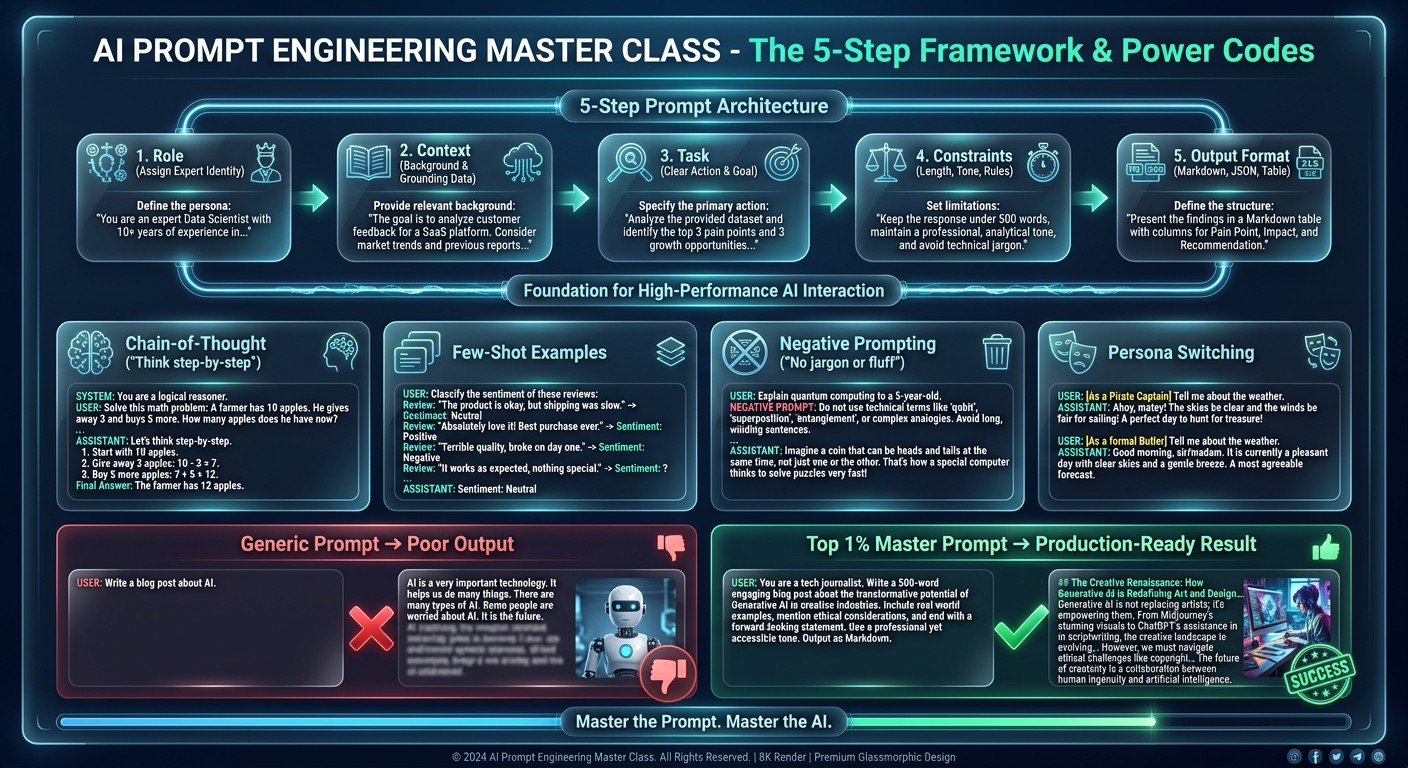
A useful work prompt explains the job, the information available and what a good answer looks like. This five-part framework is a starting point, not a certified method or a guarantee of expert output. No prompt removes the need to check facts, permissions and consequential decisions.
The five-part framework
- Role — name the perspective you want, such as a patient software trainer. A persona does not give an AI professional credentials.
- Context — explain who will use the answer, the tool involved and relevant approved information.
- Task — ask for one concrete deliverable rather than a vague request to improve everything.
- Constraints — specify what must stay unchanged, what the AI must not assume and when it should ask a question.
- Output format — ask for a checklist, short table or draft that fits the job.
Example: a Slack onboarding prompt
Act as a patient software trainer. I am onboarding a new colleague into our Slack workspace. They need to find our approved SOPs and ask questions in the right channel. Draft a day-one checklist. Do not assume admin access or paid features, and do not invent our channel names. Use placeholders for missing details. Keep it to six steps, include a result check for each, and list what I need to confirm before sharing it.
Review the draft in your actual workspace. Replace placeholders with approved names, remove steps that your plan does not support and have a colleague try it before calling it an SOP.
For a complete rollout, use the software onboarding checklist for businesses.
Improve a weak answer without starting over
- Give one example of the format you want. Label it as an example, not as evidence.
- Replace vague words such as 'professional' with specific requirements: audience, length and tone.
- Ask for missing assumptions and source links where facts matter. Open the links and check that they support the answer.
- Ask for a concise explanation and verification steps, not private internal reasoning.
- Tell the AI which part is wrong and what must stay the same before asking for a revision.
Check before you use the result
Confirm that button names, numbers and cited sources are real. Check code in a test environment and keep customer data, passwords and API keys out of prompts. For billing, legal, medical or access-control decisions, get the appropriate human review. The diagram's 'Top 1%' and 'production-ready' labels are promotional wording, not measured performance or a reason to skip testing.
Do special power words guarantee better results?
No. A clear goal, relevant context and examples are useful, but performance depends on the task and model. Treat every answer as a draft that needs appropriate checks.
AI Online Office focuses on practical software guidance. Explore the plain-English tool guides for specific workflows rather than relying on one universal prompt.